Software adoption fails because organisations treat it as a training problem when it is a behaviour problem. People do not resist the new software. They cling to the old workflow. The SUE | Influence Framework©, described in my book The Art of Designing Behaviour (2024), reveals that old software habits are automatic (System 1) while new tools require conscious effort (System 2). Until the environment is redesigned to make the new tool the path of least resistance, adoption will stall.
The Numbers That Define the Problem
A mid-sized logistics company bought HubSpot to replace a patchwork of spreadsheets and email threads. The sales director championed the project. Everyone got trained. The onboarding was smooth. Six months later, the sales team was still running their pipeline in Excel. The HubSpot data was patchy and unreliable because half the team entered contacts sporadically, while the other half did not bother at all. The sales director was frustrated. The CFO was asking about the licence cost. The IT team was blamed for picking the wrong tool.
This is not a story about a bad CRM. HubSpot works fine. It is a story about behaviour. And it plays out in organisations of every size, in every industry, whenever software adoption is treated as a technology challenge rather than a behavioural design challenge.
In my book The Art of Designing Behaviour (2024), I describe what I call de missende laag, the missing layer. Every major organisational initiative that fails to land is missing the same thing: a serious account of what actually drives and blocks human behaviour. Not what people say in the training evaluation. What they do on a Tuesday afternoon when they need to log a client interaction and the old spreadsheet is one click away.
What the Conventional Explanation Gets Wrong
Ask most IT directors why software adoption stalls, and you get three answers: the UX is not intuitive enough, the training was insufficient, or they picked the wrong software. These are not wrong observations. They are looking at the wrong level.
The problem with explaining software adoption failure through UX, training, or software selection is that it leads to more of the same. Better UX still requires users to open the tool. More training still assumes knowledge translates to behaviour. A different software package still competes with the same entrenched habits. The 49% feature usage figure from Pendo tells the story: even when people do use the software, they use half of it. The other half requires changing how they work, and that change does not happen through onboarding videos.
Behavioural science is clear on why. Kahneman’s research on System 1 and System 2 thinking shows that most of what people do at work operates on autopilot: fast, automatic, anchored in routines built over months and years. Opening Excel to update a client list is System 1. Opening a new CRM, finding the right field, entering data in a different format: that is System 2. Every single time. Until the new behaviour becomes a new habit. And that transition does not happen through training manuals and reminder emails. It happens through environment design.
People do not resist new software. They default to old habits. That is not the same thing, and it requires a completely different response.
The SUE | Influence Framework©: Diagnosing the Real Blockers
At SUE, we use the Influence Framework©, which I developed and described in The Art of Designing Behaviour (2024), as the starting point before any intervention. The framework maps four forces that determine whether behaviour changes. For software adoption, we see the same pattern in every organisation we work with.
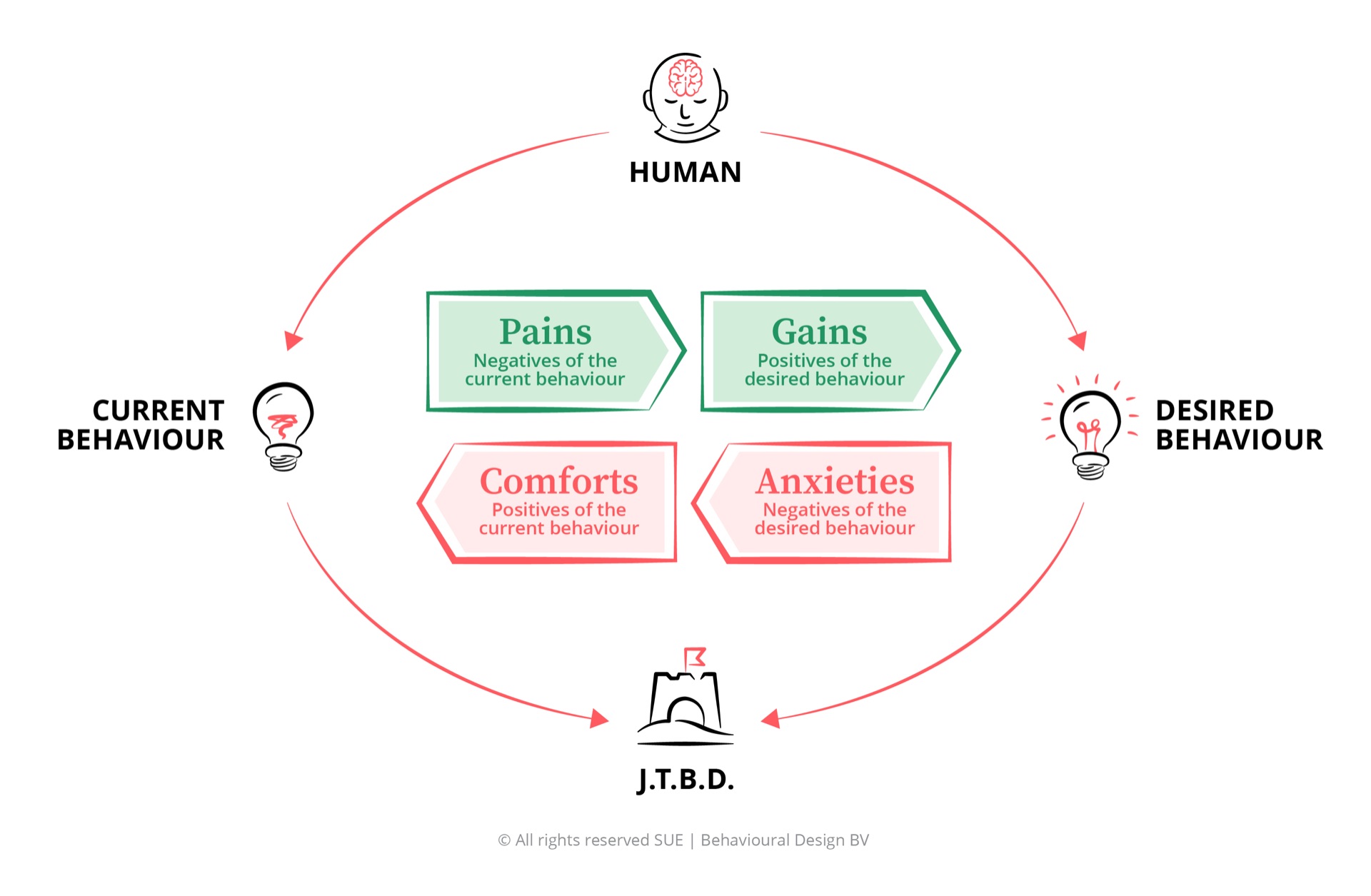
Why people don’t switch to the new software
The Influence Framework maps four forces that determine whether behaviour changes. For software adoption, the diagnosis is consistent: the driving forces are real but future-oriented; the blocking forces are immediate and automatic. This asymmetry explains why good software with good training still fails to land.
Wasted licences and poor ROI: The organisation is spending tens of thousands on Salesforce, SAP, or HubSpot licences. Usage is low. The board is asking questions. Finance wants to see a return, and the numbers are not there.
Teams still living in spreadsheets: Despite the new CRM or ERP, teams maintain shadow spreadsheets and manual trackers. Data is fragmented across systems. Nobody trusts the numbers in the official tool because not everyone uses it consistently.
Board and management pressure: The software investment was a strategic decision. Underadoption is visible. There is real pressure to show results, and the current trajectory is not delivering.
Efficiency and time savings: The new software genuinely offers faster workflows, automated reports, centralised data. These benefits are real. They are also abstract until someone has actually experienced them through consistent use.
Data-driven decision-making: With full adoption, the organisation gains visibility into sales pipelines, project progress, customer interactions. That visibility is worth a lot. But it requires everyone to contribute data consistently, which brings us back to the behaviour problem.
Competitive advantage: Organisations that integrate their tools effectively outperform those that do not. This is true and widely understood. It is also a future benefit that competes with present comfort.
“Excel works fine for me”: The current workaround is familiar, fast, and completely automatic. The sales rep knows exactly where every client sits in their spreadsheet. The project manager has a personal tracker that works perfectly. These are not irrational preferences. They are deeply efficient habits.
“I know where everything is in the old system”: The old tool, however imperfect, has been mastered. Every shortcut is known. Every workaround is practised. The new system requires relearning all of that, and relearning feels like going backwards.
Familiar workarounds feel like productivity: People have built entire workflows around the old tools. These workarounds are not ideal, but they feel productive because they are effortless. Switching to the new system makes the same tasks temporarily slower. That feels like a loss.
“What if I lose my data?”: The fear that migrating to the new system will mean losing track of client information, project history, or personal records. This anxiety is powerful because the cost of losing data is concrete and immediate, while the benefit of migration is abstract.
“What if I look incompetent?”: Learning a new tool means being slow at something you used to be fast at. In front of colleagues, managers, clients. Nobody says this out loud. Everyone feels it. It is one of the most powerful blockers in any software rollout.
“What if the new system is worse?”: People have seen software rollouts before. Some were abandoned. Others were replaced within two years. The rational prediction, based on personal experience, is that this tool might not last either. Why invest the effort?
The key insight: Old software habits are automatic. They run on System 1: fast, effortless, embedded in daily routines. New tools require System 2: conscious effort, deliberate choices, active learning. Every time someone needs to log a client interaction, System 1 says “open the spreadsheet” and System 2 says “open the CRM.” System 1 wins unless the environment is redesigned to change the default. Training cannot fix this. Environment design can.
Three Failure Scenarios and How to Fix Them
Scenario 1: The CRM Nobody Uses
A B2B services firm buys Salesforce to replace a mess of spreadsheets, email folders, and sticky notes. The sales team gets three days of training. A Salesforce champion is appointed. For the first two weeks, activity is high. Then it drops. By month three, the top performers have reverted to their personal spreadsheets. The Salesforce data is incomplete. Management cannot trust the pipeline reports. The Salesforce champion is spending more time chasing data entry than doing actual sales work.
The training gave people capability. It did not change the trigger. When a sales rep finishes a call and needs to log it, the spreadsheet is already open on their screen. Salesforce requires opening a browser, logging in, navigating to the right record. Three extra steps. That is enough for System 1 to win every time.
Scenario 2: The ERP That Created Two Systems
A manufacturing company goes live with SAP to replace its legacy inventory and procurement system. The migration is technically successful. Data is transferred. Training is completed. Three months later, the operations team is maintaining shadow spreadsheets alongside SAP. They enter the minimum required data into SAP for compliance, then manage their actual work in Excel. The company now has two systems: the official one that management sees, and the real one that employees actually use.
The old system was embedded in daily routines that nobody redesigned. The purchasing manager has a morning ritual that starts with opening a specific spreadsheet. Every supplier has a row. Every order has a colour code. SAP does all of this better, in theory. In practice, the spreadsheet takes five seconds and SAP takes two minutes. That difference compounds across dozens of daily actions.
Scenario 3: The Collaboration Tool That Fragmented Communication
A professional services firm introduces Microsoft Teams to replace the email-heavy culture. The intention is clear: faster communication, better project coordination, fewer lost threads. Six months in, communication is split across more channels than before. Some conversations happen in Teams, others in email, others in WhatsApp groups that formed spontaneously. Nobody knows where to find the latest version of anything. The tool that was supposed to simplify communication has made it more complex.
Teams was added on top of existing channels without removing the old ones. Email still works. WhatsApp is still faster for quick questions. Teams became one more place to check, not the place. Without a clear social reason to be in Teams, people default to wherever feels easiest. And easiest is always the channel they were already using.
Five Behavioural Interventions That Actually Work
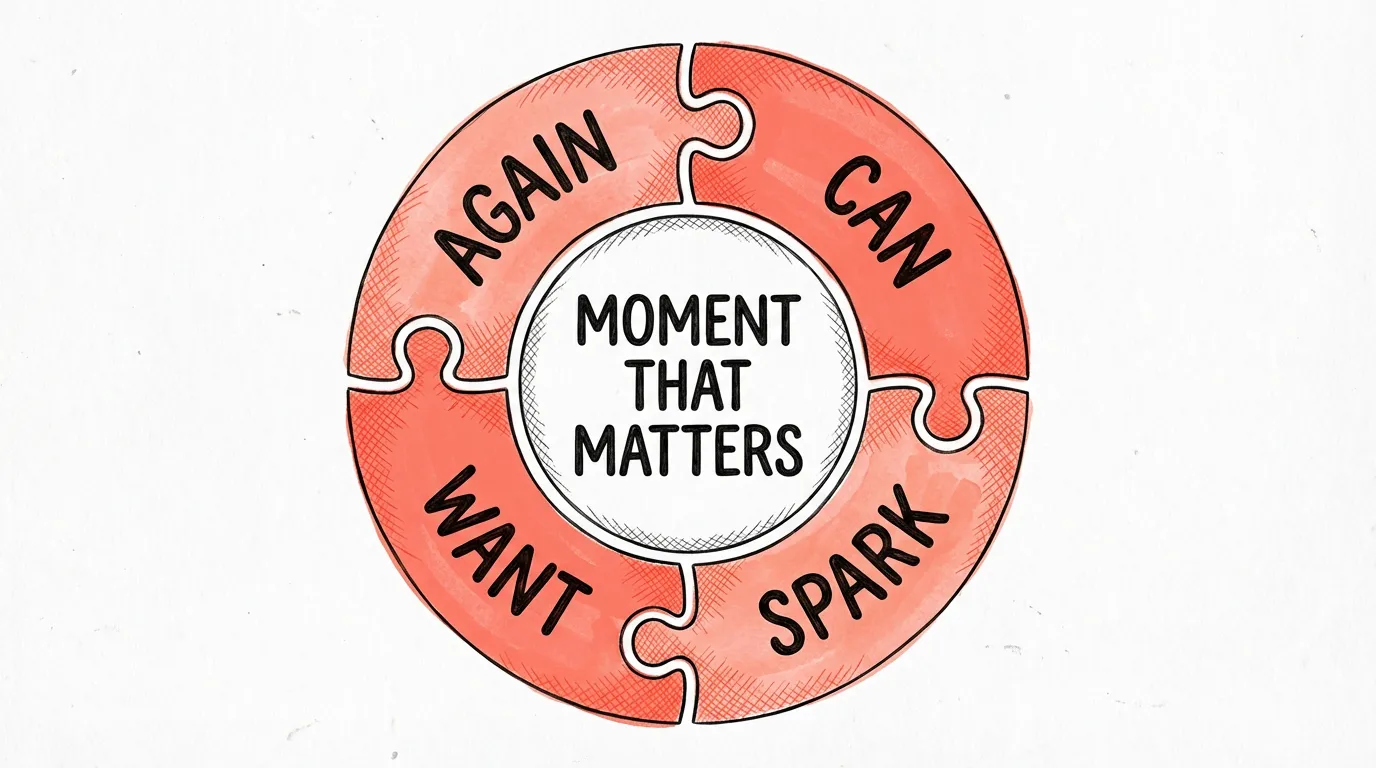
None of the following are about better training, clearer communication, or more onboarding sessions. They are all about changing the environment so that using the new software becomes the path of least resistance, which is the core principle of the SUE | Behavioural Design Method©.
-
Map the Workflow Before the Tool
Before rolling out any software, map the three to five daily moments where the old tool is most deeply embedded. The moment a sales rep finishes a call. The moment a project manager starts their Monday. The moment a purchasing officer processes an order. These are the moments where the old behaviour is automatic and the new behaviour must compete. If you do not know these moments, your rollout is targeting awareness, not behaviour.
-
Make the Old Way Slightly Harder (SPARK)
You do not need to block the old tools entirely. You need to add just enough friction to break the automaticity. Move the spreadsheet off the desktop. Add one extra login step to the legacy system. Make the old template slightly less accessible. The goal is not punishment. The goal is disrupting the System 1 autopilot that keeps people in the old workflow, so that the new tool gets a chance to become the new default.
-
Design the First Five Minutes (CAN)
The first five minutes of any new software experience determine whether someone comes back. If those five minutes involve confusion, error messages, or the feeling of being lost, the anxiety forces win and the person reverts. Design the first interaction to produce an immediate, visible win: auto-import their existing contacts, pre-populate their dashboard, show them something useful before asking them to do anything. Reduce the gap between opening the tool and feeling competent.
-
Build Social Proof Into Adoption (WANT)
People look at what their colleagues do before deciding what they will do. If the top performer on the team is not using the CRM, nobody else will either. Make adoption visible: a live dashboard showing who is active, a weekly recognition of teams with the highest engagement, visible examples of real outputs generated through the new tool. Social proof is not a communication technique. It is a System 1 force that shapes behaviour more powerfully than any rational argument.
-
Build Repetition Into Team Rituals (AGAIN)
Habit formation requires repetition in a consistent context. Build software use into recurring team rituals: the Monday planning pulls from the new tool, the Friday review references the new dashboard, the monthly report is auto-generated from the system. Not as an optional extra, but as the structural way the team works. Two minutes of visible output from the new tool per meeting is enough to start the habit loop.
Frequently Asked Questions
Why does software adoption fail?
Software adoption fails because organisations treat it as a technology and training problem when it is a behaviour problem. They invest in licences, onboarding, and user guides but ignore the psychological forces that keep people anchored to their existing tools. The SUE Influence Framework identifies four forces: the Pains and Gains that drive people towards new software, and the Comforts and Anxieties that pull them back. When blocking forces dominate, which they do by default, adoption stalls regardless of how good the software is.
What percentage of software implementations fail?
According to Gartner, 70% of software rollouts fail to deliver the expected return on investment. Pendo (2023) found that only 49% of enterprise software features are actually used. Zylo estimates the average enterprise wastes over $10,000 per employee per year on unused software. These numbers are consistent across CRM, ERP, and collaboration tool deployments, and they point to a systemic problem that better technology alone cannot solve.
What is the SUE Influence Framework and how does it apply to software adoption?
The SUE | Influence Framework© is a diagnostic tool which I developed at SUE Behavioural Design and described in my book The Art of Designing Behaviour (2024). It maps four forces that determine whether people change their behaviour: Pains and Gains (driving forces) versus Comforts and Anxieties (blocking forces). For software adoption, the critical insight is that old software habits run on System 1 (automatic, effortless) while new tools require System 2 (conscious, effortful). The blocking forces win unless the environment is actively redesigned.
How is behavioural design different from change management for software rollouts?
Traditional change management for software rollouts focuses on training sessions, communication plans, and stakeholder buy-in, all operating at the level of rational persuasion (System 2). Behavioural design operates at the level of the environment: it redesigns the defaults, triggers, social norms, and workflow moments so that using the new software becomes easier than using the old one. Rather than asking people to choose differently, behavioural design makes the right choice the path of least resistance.
What is the SWAC Tool© and how does it help with software adoption?
The SWAC Tool© is a SUE Behavioural Design instrument for designing behaviour change interventions at Moments that Matter. SWAC stands for: Spark (the environmental trigger that initiates the behaviour at the right moment), Want (making the behaviour socially motivating), Again (building repetition so behaviour becomes habit), and Can (removing barriers so the behaviour is possible without friction). For software adoption, this means making the new tool the default starting point, making the old system harder to access, building team rituals around the new tool, and designing the first experience to feel competent rather than confusing.
PS
At SUE, we see this in every software rollout we are asked to help with. The tool is fine. The training was fine. The communication was fine. And yet half the team is still using spreadsheets. The frustration from IT, from management, from the people who championed the project, is real and entirely understandable. But the fix is not more training or stricter mandates. The fix is redesigning the environment so that the new tool is easier to use than the old one. That is what behavioural design does. If you want to understand how to apply this to your own software adoption challenge, our Fundamentals course is where we start, rated 9.7 by 5,000+ alumni from 45+ countries.